
1. Tick “Digital Download”
Open any product in your control panel, go to the Advanced tab and tick Digital Download. Weight and shipping drop away, because there’s nothing to post.
Sell ebooks, music, sewing patterns, printables, fonts, video and other files from the same store as everything else. Upload the file to the product, and every paid order gets a secure download link by email, automatically. No third-party app, no file-sharing links to send by hand.
Build your store free, then upgrade to Startup when you’re ready to sell files.
Open any product in your control panel, go to the Advanced tab and tick Digital Download. Weight and shipping drop away, because there’s nothing to post.
Add one file or several: the PDF and the EPUB, or the album and the artwork. A storage meter on the panel shows how much of your plan’s space you’ve used.
When the order is paid, your customer gets a “Your downloads are ready” email with a secure link for each file. Card payments deliver straight away; offline orders deliver when you click Mark as Paid.
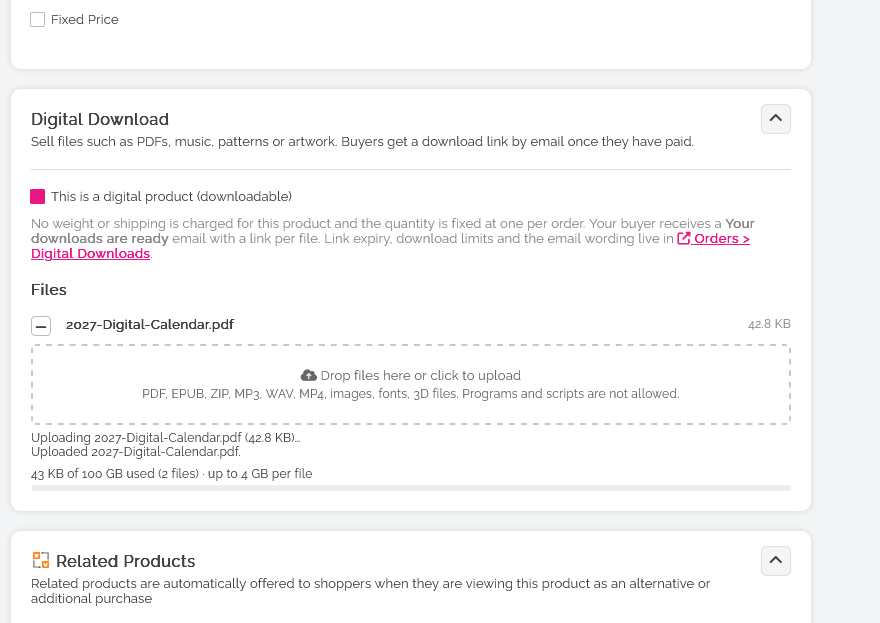
PDF, EPUB, ZIP, MP3, WAV, MP4, images, fonts, 3D files and similar formats are all welcome. Programs and scripts are refused, and every upload is checked for malware before it can be sold.
Novels, cookbooks, workbooks and how-to guides as PDF or EPUB. Sell the paperback and the ebook side by side. Selling books →
Tracks, albums, sample packs and audiobooks as MP3 or WAV. Zip up a whole release as one download.
Sewing and knitting patterns, planners, wall art, colouring pages and templates. Make it once and sell it as many times as you like.
High-resolution images, digital art and wallpapers. Offer a framed print and the digital file in the same store. Selling art →
Typefaces, 3D printing files and design assets. Bundle several files into one product, or one ZIP.
Tutorials, workouts, recorded classes and films as MP4. Larger plans take bigger files, up to 4 GB each on Ridge.
Included on every paid plan. Not available on the free Community plan.
Every order with a digital product gets a Digital Delivery card on the order page. You can see exactly what your customer received and what they’ve done with it, so you can sort any problem without a support ticket.
See each link’s status (active, expired, limit reached or revoked), how many downloads are used, and when each one happened.
The link on the card is the one your customer was sent. Copy it and paste it into a reply. No guessing.
Open the file yourself to check it, without using up any of your customer’s downloads.
Lost the email? Re-send the links in one click, with any missing ones issued automatically.
Customer ran out of downloads or let the link expire? Reset the count and give them a fresh expiry date.
Shut a link off whenever you need to. Refunds and cancellations revoke links automatically.
Links last 30 days and allow 5 downloads per file by default. Change both, and the email wording, under Orders > Digital Downloads.
Digital and physical products can go in the same order. Shipping is only charged on the things you post. One copy of each digital product per order.
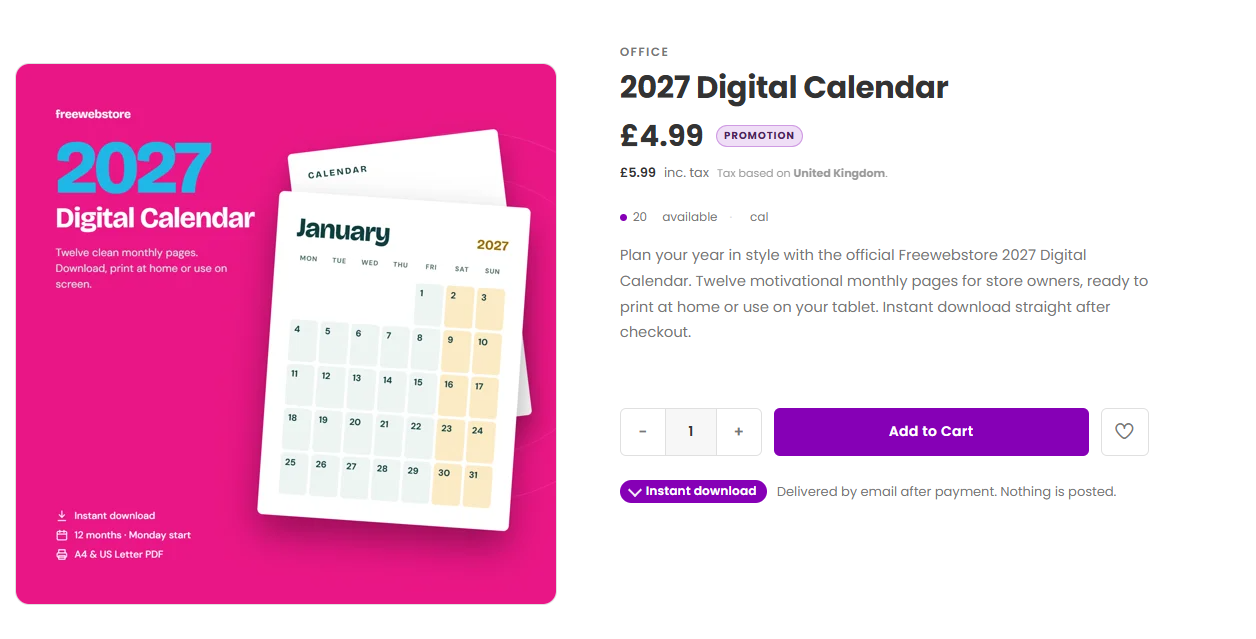
On EPIC designs, digital products show an Instant download badge so shoppers know exactly what they’re buying.
Programs and scripts are refused, and every upload is scanned for malware before it can be sold. Your customers only ever download what you meant them to.
Digital products stay out of your Google Shopping feed by default, because Google’s Shopping ads policy doesn’t accept ebooks. They still show in your store and in normal search.
Automating your catalogue? Digital products work through the Store API and our MCP tools for AI assistants as well.
Every paid plan: Startup, Pro and Ridge. Digital downloads aren’t available on the free Community plan. You can build your store on Community and upgrade when you’re ready to sell files.
PDF, EPUB, ZIP, MP3, WAV, MP4, images, fonts, 3D files and similar formats. Programs and scripts aren’t allowed. A product can have more than one file, and your customer gets a link for each.
Startup: 2 GB, with files up to 250 MB each. Pro: 10 GB, files up to 1 GB. Ridge: 100 GB, files up to 4 GB. A meter on the Digital Download panel shows how much you’ve used.
As soon as the order is paid, they receive a “Your downloads are ready” email with a secure link for each file. Card payments deliver straight away. For offline payments, the links go out when you click Mark as Paid on the order.
30 days and 5 downloads per file, by default. You can set anything from 1 to 365 days and 1 to 100 downloads, and edit the email wording, under Orders > Digital Downloads.
Open the order. The Digital Delivery card shows each link’s status, downloads used, the full history and the exact link your customer received. Copy it, test the download yourself (it won’t count against them), re-send the links, reset the limits or revoke them.
Yes. Digital products have no weight and no shipping charge, so they sit happily in a basket next to physical items. Shipping is only worked out for the physical products. Customers buy one copy of each digital product per order.
The download links for that order are revoked automatically, so a refunded file can’t keep being downloaded.
Your files are kept, and links you’ve already sent keep working until they expire. You can’t sell or upload new digital products until you’re back on a paid plan.
Not by default. They’re left out of your Google Shopping feed, because Google’s Shopping ads policy doesn’t accept ebooks and a download has no shipping details. They still appear in your store and in normal search results.
No. Each digital product is a one-off purchase. Freewebstore doesn’t offer recurring billing or subscription products.
Build your store free on Community. Upgrade to Startup, Pro or Ridge to start selling digital downloads.
Start my free storeNo credit card to start. See paid plans.